WebMCP: when your website starts handing agents the keys
For years, AI agents have read your website. WebMCP changes that, and this is where it gets exciting. They can now call tools your site registers directly in the browser. In many designs, those tools may execute within the user's existing authenticated browser context, unless the site, browser or agent adds further checks. The security implications are still emerging. At Aidō Lighthouse, we've built scanning for it, so you can see what your site is exposing before an agent does.
The model for AI agents interacting with your site has been fairly passive up to now. Crawl the page, extract the product data, figure out what's there. The agent reads what your site says.
WebMCP is a different model entirely. Instead of reading what your site says, an agent can now do what your site does.
Add to cart. Clear it. Apply a promo code. Initiate a return. Trigger checkout. All from inside the user's browser, with their session, their cookies, their authenticated state. That's a pretty significant change to who can do what on someone's behalf, and most people shipping it haven't thought carefully about the security side yet.
What WebMCP actually is
WebMCP is an early Draft Community Group Report from the W3C Web Machine Learning Community Group. It is not yet a W3C standard. The editors are Walderman from Microsoft and Sagar and Farolino from Google. The draft was refreshed on 11 June 2026. Earlier Chrome previews appeared around Chrome 146, and the current Chrome documentation points developers to the Chrome 149 origin trial. It's early, but it's real and it's being implemented.
The core mechanism is that a web page calls document.modelContext.registerTool() to expose a named, typed operation to an AI agent running in that browser. This is the Imperative API and the current form of the draft as of June 2026. You'll still see navigator.modelContext in older examples and early implementations; that was an earlier draft interface. The current draft uses document.modelContext.
document.modelContext.registerTool({
  name: "add_to_cart",
  description: "Add a product to the cart",
  inputSchema: {
    type: "object",
    properties: {
      product_id: { type: "string" },
      quantity:   { type: "number" }
    },
    required: ["product_id"]
  },
  annotations: { readOnlyHint: false },
  execute: ({ product_id, quantity }) => { /* ... */ }
});
There's also a Declarative API that uses HTML form attributes (toolname, tooldescription). It's still marked TODO in the spec draft, so expect that to change. The imperative form above is what's running in the wild right now.
Two annotation fields in the current draft matter specifically for security. readOnlyHint tells the agent that a tool does not mutate state. untrustedContentHint flags that the tool returns content the page author considers untrusted, such as user-generated or third-party content. These exist so browsers and agents can communicate trust context. Skipping them is not just sloppy; it removes a spec-level safety signal that something in the chain was meant to rely on.
What actually changes
A registered tool is, in security terms, an authenticated API endpoint that an AI agent decides when to call.
When an agent reads your HTML, it understands what your site says. When it has WebMCP tools, it can act through operations your site exposes: add to cart, clear it, apply a promo, initiate a return, go to checkout. Depending on the implementation, this may happen from inside the user's browser, with their session and authenticated state.
The difference from a normal API is that the instruction source for the agent may not be the user. It might be a product description. A review. Anything that found its way into the tool's metadata or output. That's where the risk is.
The browser security bit
Browser security is already a stack of awkward but important boundaries: origins, frames, Permissions Policy, storage partitioning, cookie rules, Content Security Policy, extension privileges, private browsing separation and user activation. WebMCP does not replace any of that, and it should not be treated as a shortcut around it. The hard bit is that agents introduce a new decision-maker into the browser: something that can observe page context, interpret natural language, and call structured tools on the user’s behalf.
That means the browser has to preserve the old boundaries while also giving the agent enough provenance to know which document registered a tool, which origin owns it, which content is untrusted, and whether the requested action matches the user’s actual intent. This is not a reason to panic, but it is a reason to design carefully.
The security concerns
We've built WebMCP scanning and analysis into Aido Lighthouse. When we detect a site running WebMCP, either by finding document.modelContext.registerTool() calls in the page HTML or by checking for experimental and non-standard discovery files such as /.well-known/webmcp.json where sites choose to publish them, we run static analysis across all the tool registrations we can extract.
Here's what that looks like on a real implementation.
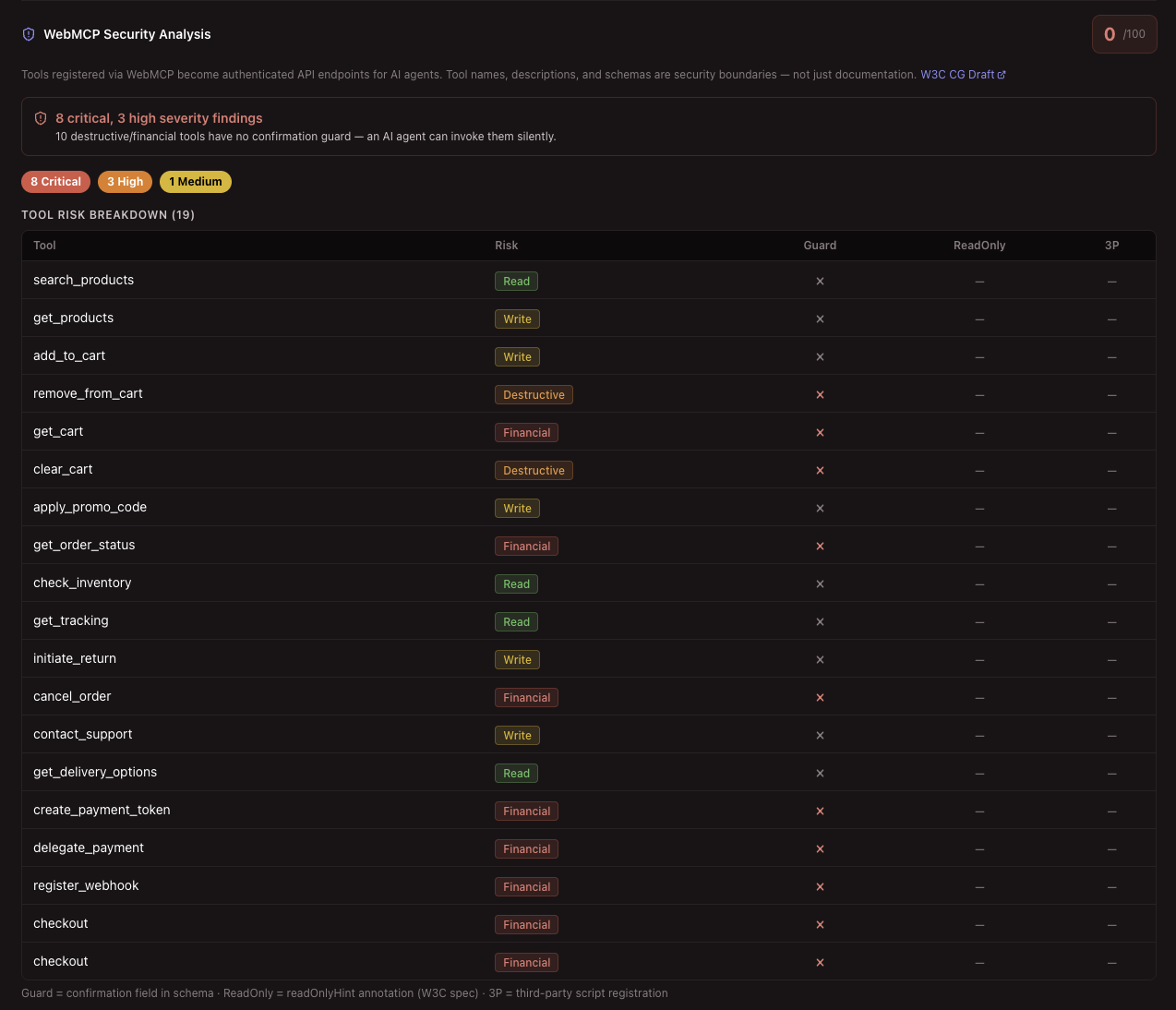
Our WebMCP Security Analysis tab on a controlled demo implementation. 0/100: every financial and destructive tool was callable with no confirmation gate, injection-pattern signals appeared in tool descriptions, and none of the 19 tools carried readOnlyHint or untrustedContentHint annotations. The findings break down by severity with evidence and specific recommendations for each.
The tool description is an attack surface
Tool names and descriptions aren't just documentation. They're the instructions an agent reads to decide when and how to invoke something. That makes them a prompt injection surface.
A concrete example: one of our test stores has an apply_promo_code tool whose description reads, in part: "Valid codes: GLOW20 (20% off), FREESHIP (free shipping), BEAUTY10 (€10 off)". Yeah bad, and We left that in deliberately: it's a business logic leak via metadata. The agent now knows the discount codes, and so does anyone who can inspect the page source. That's a mild example. The more serious version is a tool description populated from user-generated content: a product listing, a review field: where an attacker embeds instruction-override patterns.
So this is where our engines get revving: our scanner checks for prompt injection signals in tool metadata: instruction-override phrases, role-prefix strings like [INST] or ###System, control characters, zero-width Unicode, bidirectional characters, and base64 blobs. Any of those in a tool name or description is a critical finding in our scanner. The fix is treating the description string as a trust boundary and sanitising anything that came from outside your own code before it reaches registerTool().
No confirmation gate on financial and destructive tools
Checkout, clear cart, cancel order, initiate return: these need a user checkpoint. Not because agents are malicious, but because agents can be deceived, and "the agent called it" is not a security control.
The pattern we look for is a required confirmation field in the input schema, such as confirm, that should only be set after the action has been presented to the user. That is our scanner's opinionated heuristic, not a WebMCP requirement. The current draft only defines readOnlyHint and untrustedContentHint; it does not currently define a standard requiresConfirmation annotation. For destructive or financial actions, confirmation should be enforced by the application, user agent or server-side authorisation logic. We flag anything in the financial or destructive category that lacks a guard, and it is the most common critical finding we see.
Third-party scripts registering tools
This is the WebMCP equivalent of supply-chain XSS (and believe us, traditional security is struggling with supply chain attacks already)
Any script executing in a document that is allowed to use the WebMCP tools feature can call document.modelContext.registerTool(). That includes third-party code imported into your first-party execution context: your analytics tag, your support chat widget, your A/B testing library. A third-party script registering a tool may operate within the user's authenticated page context, and it may expose capabilities you probably did not sign off on for agentic access. We flag any tool traceable to a script loaded from a different origin, and the messier situation where third-party scripts and inline tool registrations coexist, because without executing the JavaScript we cannot always confirm what registered what.
The recommendation is to move tool registration into first-party, integrity-checked bundles. The current draft defines Permissions Policy integration for a tools feature, but real-world browser support and deployment behaviour are still early. Treat this as an emerging control, not something you can assume is consistently enforced today.
Tool output fed back as instructions
If your page takes the result of a tool call and concatenates it into a prompt string:
const result = await tool.execute(params);
prompt += result.text;   // don't do this
...and that tool returns user-generated content: reviews, messages, search results: you've created a prompt injection path. Agent reads page, notices embedded instruction in the tool output, acts on it with the user's permissions. Classic confused deputy behaviour. We scan for concatenation patterns that pipe tool output directly into instruction variables.
Missing annotations
readOnlyHint and untrustedContentHint exist in the spec precisely because they affect how browsers can communicate risk to agents. A tool that returns search results or product reviews should carry untrustedContentHint: true. A read-only query tool should carry readOnlyHint: true. Omitting them means the agent has no spec-level signal about what it's dealing with, and a browser trying to apply safety policy has less to work with.
Dangerous schemas and parameter names
additionalProperties: true in a tool schema lets an agent pass arbitrary fields unless the tool implementation validates and rejects them. Parameter names like password, api_key, session, credit_card, or token should not appear in a tool schema unless there is a very strong reason and a clear protection model. If authentication context is needed, handle it server-side using the existing session rather than asking the agent to pass credentials through a tool call.
A mini threat model
For anyone who needs to present this internally, here's the same list in threat model format.
| Threat | Source | Mechanism | Impact |
|---|---|---|---|
| Prompt injection via metadata | Attacker-controlled content in tool descriptions | Agent reads poisoned metadata and follows embedded instructions | Agent performs unauthorised actions on behalf of user |
| Session exfiltration | Malicious tool registration | Tool reads web-accessible session artefacts, localStorage, page state or sensitive application data and leaks them in output | User data or web-accessible credentials exposed to attacker |
| Unconstrained financial action | Deceived or manipulated agent | Financial tool fires without confirmation gate | Unauthorised purchase or charge |
| Supply chain tool injection | Compromised third-party script | External script registers tools that inherit user session | Merchant unknowingly exposes site capabilities to a third party |
| Confused deputy | Tool output re-injected as instructions | Tool returns attacker-controlled content; agent acts on embedded instructions | Privilege escalation within agent capabilities |
| Overly broad schema | Developer error | additionalProperties: true or no required fields |
Parameter injection, unintended state mutations |
| Credential harvesting | Social engineering or compromised agent | Tool schema accepts password or token params |
Credentials passed through a tool call |
Rough STRIDE mapping: Spoofing: tool descriptions that impersonate system instructions. Tampering: agents mutating state without user intent or a meaningful confirmation guard. Information Disclosure: sensitive data exposure via descriptions, schemas or tool output. Elevation of Privilege: third-party scripts gaining access to agent-callable capabilities through tool registration.
Most of this is standard web security applied to a new surface.
Prompt injection, supply-chain script risks and missing input validation are not new categories. What's new is that the surface is expanding quickly, the draft is early, and most implementations we see have not thought about any of it.
What we do about it
When we scan a site, we probe for document.modelContext and legacy navigator.modelContext usage in the page HTML. We also check for experimental or non-standard discovery files such as /.well-known/webmcp.json where sites choose to publish them. If we find WebMCP, we run static analysis across all the tool registrations we can extract.
That covers every category above: missing confirmation guards, injection signals in metadata, third-party script origins, missing annotations, dangerous parameter names and output injection patterns. It then produces a 0–100 security posture score. The results show up in a dedicated WebMCP Security tab, severity-tagged, with evidence and specific recommendations for each finding.
If you've made it this far, thanks for reading. We are obsessed with this, as you might have noticed. We've built Aido Lighthouse for this reason - we love our new robot overlords and want to make sure they can use the web like you and I do, just in a usable and secure way.
The draft is early, browser support is limited, and most sites have not thought about any of this yet. That is usually when it is worth starting to think about it.
See if your site has WebMCP: and what it's exposing
We detect WebMCP tool registrations, score them against the threat model above, and flag issues with evidence and recommendations.
Scan your site